Typing your name creates a signature style image
When you type a name into a signature generator, the tool converts that text into a graphic that resembles handwriting. The output can look similar to something written with a pen, but the handwriting was generated from text rather than captured from a real signature.
That makes it useful for a mockup, an email graphic, a design asset or a document workflow that explicitly accepts an image mark. It should not automatically be treated as your genuine handwritten signature.
The phrase digital signature can mean something very different in security and legal systems. NIST describes digital signatures as cryptographic mechanisms used to authenticate the claimed signer and detect unauthorised modification of signed data. A signature style PNG or JPG created from typed text does not provide those properties by itself.
Three things people call a digital signature
| Type | What it actually is | Typical use |
|---|---|---|
| Signature image from text | A graphic generated from typed characters | Design, mockups and permitted image fields |
| Scanned handwritten signature | An image captured from a real handwritten mark | Forms or documents that accept an image signature |
| Cryptographic digital signature | A mathematical signature generated with cryptographic keys | Workflows that require authentication and document integrity |
These outputs can look similar on a page while providing very different evidence about who signed and how the document was protected. Naming the output accurately keeps a visual asset from being mistaken for proof of identity.
Why an image signature does not prove who signed
NIST explains that a digitised signature is created by converting a visual handwritten signature into an electronic image. It can be copied or attached to other electronic data and does not by itself show whether the information was changed afterward.
A cryptographic digital signature works differently. It is generated using cryptographic keys and linked to the signed data, so verification can help show who created the signature and whether the data changed afterward.
A signature image generated from typed text has even less connection to a person’s actual handwriting because the mark itself was created by software. That does not make the image useless. It means its role should be described accurately.
Good uses for a text to signature tool
- Creating a handwriting style name for a design, profile or visual mockup.
- Producing a graphic with a signature style for a document workflow that explicitly accepts a visual mark.
- Trying different styles before deciding how you might write your own name by hand.
- Creating a decorative transparent signature image for creative work outside an official application.
The common thread is that the image is being used as a visual element. It should not be presented as stronger proof of identity than the workflow actually provides.
Do not substitute a generated style when the workflow asks for your real signature
Recruitment forms, examination portals and identity related applications can ask for the applicant’s genuine signature because it can be compared with a signature used later.
In those workflows, typing your name into a generator and choosing a handwriting style does not create your genuine signature. Use a real handwritten source instead, then prepare that source with Signature Resizer or isolate it with Signature Extractor when needed.
The same principle applies when a document requires authenticated electronic signing, a digital signature that uses a certificate or another secure signing method. A signature image should not be used to imitate those processes.
Which PassportPhotoBox signature tool fits the job
| Tool | Best use |
|---|---|
| Text to Signature | Create an image with a signature style from typed text or a drawing |
| Signature Resizer | Resize your genuine signature for an application |
| Signature Extractor | Isolate your genuine signature from a document image |
| Apply Signature to PDF | Place an authorised signature image onto a PDF |
The tools are related, but they do not establish the same thing. A generated signature style should not be described as replacing a real applicant signature when an official form expects one.
A convincing style at large size can become unreadable when reduced
Signature generators can look most impressive in a large preview because long flourishes, loops and overlapping strokes have room to spread out. The same design can turn into a dark tangle when it is placed inside a small document field.
Compare several styles at roughly the size where you expect to use the image. Check whether the first letter remains recognisable, whether dots disappear and whether the final flourish collides with the rest of the name.
Simpler designs can survive resizing better because fewer strokes compete for the same small number of pixels.
What changes when the style becomes more decorative
| Style feature | Possible problem after resizing |
|---|---|
| Long flourish | It can be cut off or dominate the image |
| Very thin stroke | It can disappear after compression |
| Heavy overlap | It can merge into a dark patch |
| Small dot or accent | It can disappear at small size |
| Tall first letter | It can force excessive blank space around the rest |
Long names need different treatment from short names
A style that works well for a short name such as “Ravi Das” can become crowded with a longer name. More letters have to fit into the same image width, which can reduce the size of every stroke.
If the tool lets you change style, spacing or output width, compare the result at normal size rather than choosing the first variation. Do not remove parts of the person’s name unless the visual use allows an abbreviated form.
For formal workflows, copy the name or wording exactly as the receiving document expects instead of creating an abbreviation simply because it fits the image more easily.
Initials are not automatically equivalent to the full name
A generated image using initials can look cleaner than a long full name, but the receiving workflow can expect the person’s established signature or complete name.
Use initials only when that is genuinely how the mark is intended to appear. Do not shorten a formal applicant signature simply to improve the graphic layout.
Transparent PNG and plain JPG solve different problems
A transparent PNG is convenient when the signature needs to sit over an existing document because only the strokes remain visible. A JPG uses a normal rectangular background and can be more suitable when an upload portal specifically asks for JPEG.
Neither format is universally better. Choose the output based on the destination rather than treating transparency as an automatic improvement.
Keep one high quality export before creating smaller copies for specific applications. Repeatedly saving an already compressed JPG can make thin generated strokes look rough.

Choose the format from the next task
| Destination | Useful format to consider |
|---|---|
| Graphic or design with another background | Transparent PNG |
| Portal explicitly requesting JPG or JPEG | JPG or JPEG |
| Reusable clean master | High quality PNG where appropriate |
| Cryptographic signing workflow | Use the signing system itself, not a signature image |
Transparency does not make the signature more authentic
Removing the background can make a signature image easier to place on a page, but it changes only presentation. It does not add identity verification, signing intent or cryptographic protection.
A clean transparent image can therefore be useful visually while still remaining just an image.
Black or blue can look familiar, but colour does not establish validity
Some people choose blue because it resembles ink on paper, while black provides strong contrast on white documents. The visual colour does not determine whether the receiving organisation considers the signature acceptable.
Follow any colour instruction given by the destination. For creative use, choose whichever colour fits the design.
A generated style can inspire handwriting, but it is not evidence of your handwriting
One legitimate use of a text to signature tool is experimenting with how a name might look before practising a personal handwritten signature. Compare several shapes, then decide which elements feel natural to write yourself.
Once you develop a handwritten signature, capture that genuine mark separately if an official application needs it. The generated reference and the signature you physically write are different sources.
Do not generate another person's signature to imitate approval
A text generator can create a handwriting style for any name entered into it. That technical ability is not permission to use the result as though another person signed a document.
Use the tool for your own visual mark or for an authorised design purpose. Do not generate somebody else’s name and place it on a form, agreement or approval field to make it appear that they signed.
The destination decides whether a signature image is enough
Some workflows need only a visible mark on the page. Others need stronger evidence of signing intent, identity verification or document integrity.
If the recipient says that an uploaded signature image is acceptable, a generated image can fit that field when the workflow allows it. If the recipient asks for your own handwritten signature, use a real handwritten source. If it asks for signing with a certificate or using a cryptographic digital signature, use the required signing system.
Seeing a signature on the finished PDF does not prove that every signing requirement has been satisfied.
Which signature method does the workflow actually want
| Instruction says | Better response |
|---|---|
| Upload your signature | Use your genuine signature unless the instructions say otherwise |
| Insert a signature image | Use an authorised image mark |
| Sign electronically | Follow the platform’s electronic signing method |
| Use Digital Signature Certificate | Use the signing process with a certificate |
| No formal signing requirement; decorative use | A generated signature style can be appropriate |
Digital signature can have a specific meaning in Indian online services
In Indian government and business workflows, the phrase digital signature can refer to a cryptographic signing process rather than an image of handwriting. When a portal specifically asks for a Digital Signature Certificate or another prescribed electronic authentication method, a PNG generated from typed text does not replace that requirement.
Read the field wording carefully. “Upload signature image” and “digitally sign the form” can sound similar while describing different processes.
Example: creating a visual signature for a PDF draft
Suppose you are preparing a draft document that allows a visual signature image and you want your name to appear in a handwritten style.
Enter the name into the generator and compare several styles. Choose one that remains readable when reduced to the space above the signature line, then export it with a transparent background if the PDF placement workflow supports transparency.
Place the image on the draft and check its size against the surrounding text. The visible mark is now part of the document design, but it has not acquired cryptographic verification merely because it resembles handwriting.
If the final recipient later asks for authenticated electronic signing, use that process for the final version rather than assuming the draft image satisfies it.
Example: an exam form asks for your signature upload
Now consider an exam application that asks for the candidate’s signature and can compare that mark later. In that situation, do not type your name into the generator and choose a style.
Write your genuine signature on the required paper or use the source method specified by the notice, then prepare that real signature with Signature Resizer.
The visual similarity of a generated style is not the important issue. The problem is that it is not the mark you actually use.
Check the export at the size where it will actually appear
A large editor preview can make every signature style look smooth. Open the exported image separately and reduce it to approximately the size it will occupy in the final document.
Check whether narrow strokes remain continuous and whether decorative loops still look intentional. If the mark turns into a dark blur, choose a simpler style or export at a more suitable resolution rather than sharpening the image afterward.
Keep the clean master when you expect to reuse the style at several sizes.
Keep the generated source separate from your genuine signature files
If you also keep scans of your real handwritten signature, store generated signature graphics separately so you do not accidentally upload the wrong type to an official application.
Descriptive filenames such as signature_style_transparent.png and real_signature_scan.jpg make the difference obvious when selecting a file later.
This simple separation becomes useful when the same computer contains creative signature graphics, exam uploads and PDF signing assets.
You can explore styles without uploading a real signature
A generator that makes a signature from typed text can let you experiment with visual styles without uploading an image of your genuine handwritten signature. That can reduce unnecessary handling when the goal is only to create a decorative graphic.
The current Text to Signature page states that typed text and freehand drawing stay in your browser until you choose to download them, and the live creation path has no upload step. That statement belongs to this generator path; it should not be generalised to every PassportPhotoBox signature or document tool.
For a real signature scan, use the relevant privacy and security information before uploading it. A smaller input is still a better privacy choice when the full document is not needed.
Create a signature style image with PassportPhotoBox
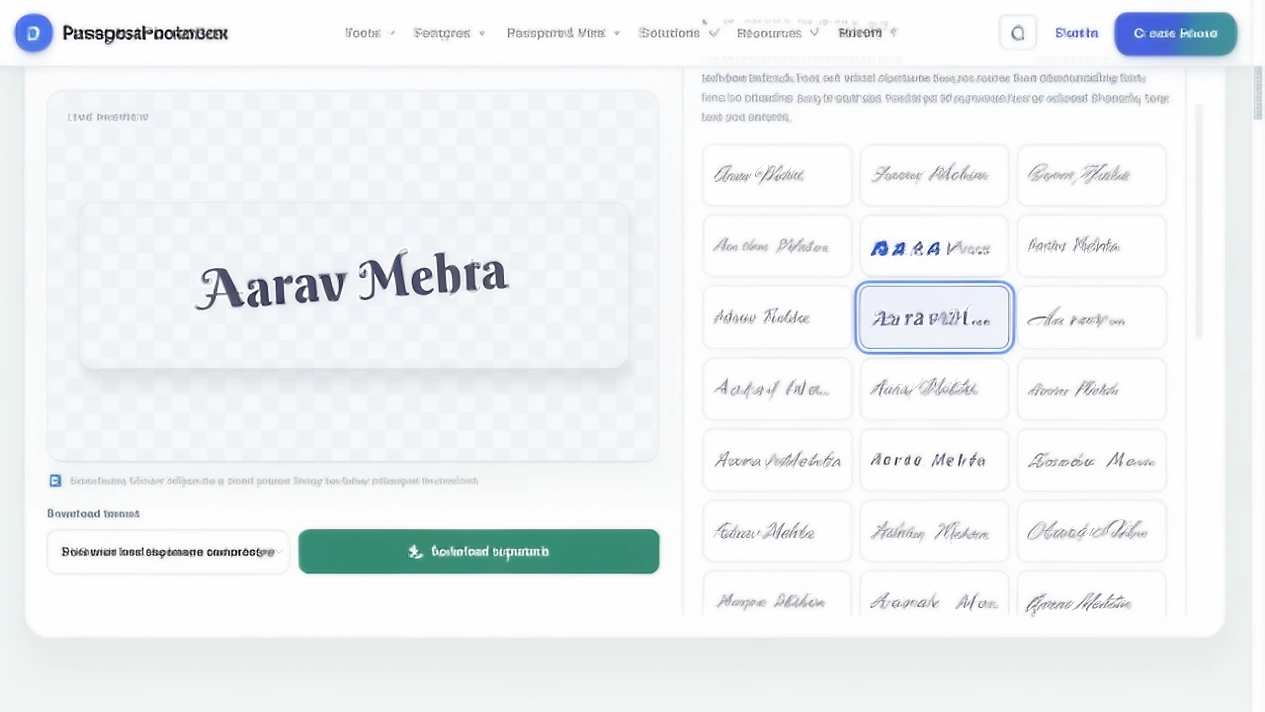
The live page is labelled Online Signature Generator, while the creation area uses Create Signature From Text and Draw Your Own Signature. The text path begins with the field For example, Sagar Kumar Sahu, then displays the name in a gallery of signature styles.
- 1.Enter your name, initials or short text in the name field.
- 2.Compare the visible styles, use Show More Signature Styles when you need more options and adjust Signature width or Stroke thickness.
- 3.Choose an ink colour and a background under Ink colour and background.
- 4.Choose PNG with lossless image compression, WebP for a compact image or JPG with a white background from Download format.
- 5.Review the live preview, then use Download signature.
The current interface shows 24 style choices before the additional style control. The exact gallery can change, so the article describes the visible controls instead of promising a fixed total.
Check a style before choosing it
Use a sample name when comparing the interface so another person’s personal information is not involved. Check the shape of the name, the exported file and its readability at the size where you plan to use it:
| Input or output | What to inspect |
|---|---|
| Short name | Whether the style remains balanced rather than leaving excess blank space |
| Long Indian name | Whether the letters become too compressed in the same canvas |
| Initials | Whether spacing and the first letter still look intentional |
| Name with a middle initial | Whether punctuation remains visible |
| Transparent export | Whether the edges remain clean over another background |
| Small resized output | Whether thin strokes disappear or merge |
In the live check for this article, “Aarav Mehta” produced visibly different style choices while the typed wording remained the same. The style gallery also showed why the preview needs a human review: some designs were simpler and more compact, while others used taller letters or heavier flourishes.
Signature image questions
Is a signature generated from text a real digital signature?
Not in the cryptographic sense. It is a visual image generated from typed text. NIST digital signatures use cryptographic algorithms to authenticate the signer and help detect changes to signed data.
Can I use a signature made from typed text on an exam form?
Use your genuine signature when the form asks for the applicant's signature. A generated handwriting style does not replace the mark you actually use in an official identity workflow.
Can I use the generated image on a PDF?
Yes, when the document owner and receiving workflow permit a signature image. If the document requires authenticated electronic or cryptographic signing, use that signing method instead.
Should I choose PNG or JPG?
Use PNG when you need transparency and the workflow supports it. Use JPG or JPEG when the destination specifically requires that format.
Can I create another person's signature from their name?
The tool can technically generate a style for any entered text, but you should not use another person's generated name to imitate their approval or make it appear that they signed something.
Is a scanned handwritten signature different from one made from typed text?
Yes. A scanned signature is an image captured from handwriting the person actually produced. A signature made from typed text is created by software from typed characters.
Create a signature style image
Compare the live styles, choose the format that fits the destination and keep the output’s role clear.
Official and technical guidance checked for this article
Application requirements and signing rules change by organisation, country and workflow. Open the source that matches your use case, then read the current notice before preparing the final file.
A signature image can look official without being an authenticated signature
A text to signature generator is good at one thing: turning ordinary text into a handwriting style graphic. That can help when a document or design needs a visible mark, and it can save you from drawing the same decorative signature repeatedly.
The important part is knowing what the image does not provide. It does not prove that somebody physically wrote the mark, and it does not create the cryptographic protection associated with a digital signature.
Use the generated image where a visual signature is enough. Use your genuine handwriting when a form asks for your signature. When a workflow requires authenticated electronic signing, use the signing method the recipient specifies.
Official and technical guidance checked for this article
Application requirements and signing rules change by organisation, country and workflow. Open the source that matches your use case, then read the current notice before preparing the final file.